
Product Data Reference
Reference for product identifiers, joins, feature flags, listing quality, competitor detection, pricing, and offer tables.
Use this page when you need to query product-level DataHawk data or join product tables together. For conceptual explanations, start with DataHawk Data Concepts.
Identifier fields
| Field name | Description | Where it appears |
|---|---|---|
ASIN | Amazon Standard Identification Number | Product-level Amazon tables |
PARENT_ASIN | Groups child ASINs into a product family | PRODUCT.*, sales estimates tables |
CHILD_ASIN | Specific purchasable variant | Sales-estimate and variant-level tables |
SKU | Seller-defined identifier | Private data tables such as orders, inventory, and COGS |
PRODUCT_KEY | DataHawk internal product identifier | Curated product and report tables |
MARKETPLACE_KEY | DataHawk marketplace identifier | Most marketplace-scoped tables |
MARKETPLACE_ID | Amazon's numeric marketplace identifier | Amazon source and reporting tables |
BSR | Best Seller Rank within a category | Product history, category, and report tables |
Product detail feature flags
PRODUCT.PRODUCT_DETAILED stores product-page attributes collected from tracked products. The FEATURES column lists activated page features detected for a product.
For Walmart products, FEATURES can include:
| Value | Meaning |
|---|---|
about_the_brand | The Walmart product page has an active About the Brand section through its marketing module |
This value appears only when DataHawk detects the feature on the page. If the section is not active or not detected, about_the_brand is absent from the FEATURES list.
Star-rating breakdown
PRODUCT.PRODUCT_DETAILED includes each product's star-rating breakdown: the share of ratings at each star level, from 1 to 5 stars. If a product has ratings but all five percentages are 0, DataHawk shows them as NULL, because that breakdown wasn't captured.
| Column | What it holds |
|---|---|
RATING | Average star rating |
RATING_COUNT | Total number of ratings |
RATING_1_STARS_PERCENT to RATING_5_STARS_PERCENT | Share of ratings at each star level. NULL when RATING_COUNT is above 0 and all five are 0. |
A single 0 is still a real value. For what NULL means, the effect on rating alerts, and the current known gap, see Ratings and Reviews.
Parent and child ASIN joins
When joining product tables, confirm whether the table is parent-level, child-level, or mixed.
PRODUCT.PRODUCT_LISTINGcontains one row per ASIN, which may be a parent or child.- To get all children of a parent, filter where
PARENT_ASIN = '<your_parent_asin>'andASIN != PARENT_ASIN. - Some visibility tables are parent-oriented, while sales and inventory often need child or SKU granularity.
- When joining public product data to private Seller data, use the ASIN/SKU mapping available in private account tables or curated report tables.
Listing quality tables
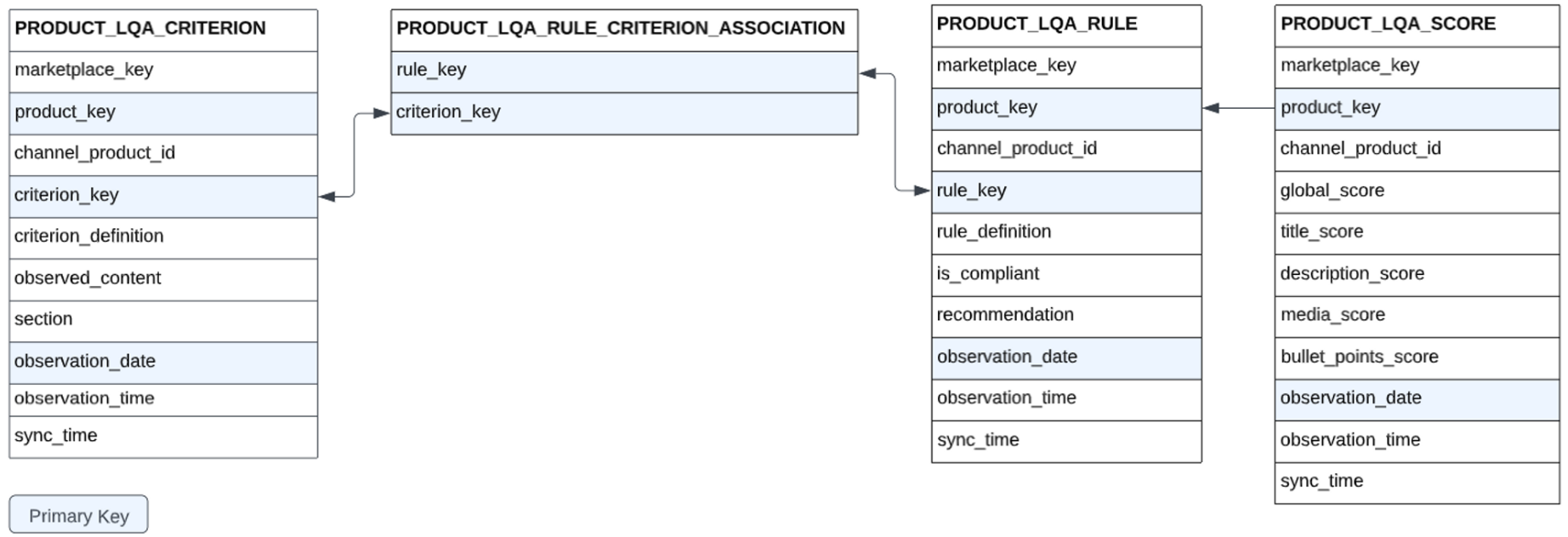
Listing Quality Analysis data lives in the PRODUCT schema and refreshes daily.
| Table | Contents | Key fields |
|---|---|---|
PRODUCT_LQA_CRITERION | Raw listing metrics | product_key, criterion_key, date |
PRODUCT_LQA_RULE | Rule compliance status | product_key, rule_key, date |
PRODUCT_LQA_SCORE | Calculated quality scores | product_key, date |
PRODUCT_LQA_RULE_CRITERION_ASSOCIATION | Rule-to-criterion mapping | rule_key, criterion_key |
Null and empty values
- Null value: DataHawk could not extract this data, so the state is unknown.
- Empty value: DataHawk confirmed the characteristic is absent. For example, an empty "Emojis in title" field means no emojis were found.
Score formula
Section score = sum(rule_compliances * rule_weights) / max_section_points
Global LQS = (Title Score * 0.4) + (Media Score * 0.3) + (Bullets Score * 0.2) + (Description Score * 0.1)
Listing issues (compliance & catalog problems)
Amazon flags catalog and compliance problems on your listings through the Listings Items API: search-suppressed active listings, inactive listings missing an offer or price, items pending approval, and more. DataHawk captures these in SELLING_PARTNER.LISTING_ITEMS.
Released June 2026. This is a raw table today, with no dedicated view or dashboard yet. Query it directly using the recipe below. See the changelog entry for what's planned next.
Where the data comes from: LISTING_ITEM_DETAILS:issues is a semi-structured array on each listing item, one entry per open issue, with a code, severity, message, categories, and attributeNames. A single SKU can have multiple issues open at once.
Recipe: current listing issues per SKU
WITH ranked AS (
    SELECT
        WORKSPACE_ID,
        ACCOUNT_KEY,
        SELLER_NAME,
        MARKETPLACE_KEY,
        SKU,
        ASIN,
        ITEM_NAME,
        EXTRACT_TIME,
        issue.value:code::STRING AS ISSUE_CODE,
        issue.value:severity::STRING AS ISSUE_SEVERITY,
        issue.value:message::STRING AS ISSUE_MESSAGE,
        issue.value:categories::ARRAY AS ISSUE_CATEGORIES,
        issue.value:attributeNames::ARRAY AS ISSUE_ATTRIBUTE_NAMES,
        ROW_NUMBER() OVER (
            PARTITION BY ACCOUNT_KEY, MARKETPLACE_KEY, SKU, issue.value:code::STRING
            ORDER BY EXTRACT_TIME DESC
        ) AS rn
    FROM SELLING_PARTNER.LISTING_ITEMS,
        LATERAL FLATTEN(input => LISTING_ITEM_DETAILS:issues) AS issue
    WHERE ARRAY_SIZE(LISTING_ITEM_DETAILS:issues) > 0
      AND EXTRACT_TIME >= DATEADD('day', -3, CURRENT_TIMESTAMP())
)
SELECT
    WORKSPACE_ID, ACCOUNT_KEY, SELLER_NAME, MARKETPLACE_KEY, SKU, ASIN, ITEM_NAME, EXTRACT_TIME,
    ISSUE_CODE, ISSUE_SEVERITY, ISSUE_MESSAGE, ISSUE_CATEGORIES, ISSUE_ATTRIBUTE_NAMES
FROM ranked
WHERE rn = 1
This dedupes to the latest snapshot of each open issue per SKU, so you don't see the same issue repeated across days. The -3 days window only controls which snapshot the dedup uses as "current". Widen it if a SKU's most recent snapshot is older than that.
This returns every issue Amazon reports, not just compliance problems. If you only want catalog/compliance issues (for example, to exclude Out of Stock, which is usually managed elsewhere), filter ISSUE_CODE, ISSUE_MESSAGE, or ISSUE_CATEGORIES to the types you care about. Amazon's own Manage All Inventory > Activate Listings > Fix Issues view in Seller Central groups these; issue types customers commonly ask to track are Search Suppressed, Detail Page Removed, Missing Offer, Pricing Issue, Approval Required, and Closed.
Known gap (as of June 2026): no "date issue first appeared" field. EXTRACT_TIME is when DataHawk captured the snapshot, not when Amazon created the issue, so this table alone can't tell a brand-new problem from one that's been open for weeks. [TO CONFIRM: whether a first-seen timestamp is planned]
Competitor detection table
| Schema | Table | Description |
|---|---|---|
PRODUCT | PRODUCT_COMPETITORS | Competitor products for owned ASINs detected from product, category, price, keyword, and co-occurrence signals |
DataHawk scores candidate competitor pairs using signals such as semantic title similarity, price comparison, shared category depth, keyword intersection, and co-occurrence on listing and search pages. Pairs must reach a 90% confidence threshold to be included.
Pricing and offers tables
| Table | What it contains |
|---|---|
PRODUCT.AMZN_PRODUCT_FEATURED_OFFER | Daily featured offer (Buy Box) snapshot per ASIN |
PRODUCT.AMZN_PRODUCT_COMPETITIVE_PRICES | Amazon competitive-price and was-price benchmarks |
AMZN_PRODUCT_COMPETITIVE_PRICES is sourced from SP-API Product Pricing v2022-05-01 (getCompetitiveSummary). It refreshes daily for tracked products and seller listings, and quarterly for other products connected to DataHawk.
AMZN_PRODUCT_FEATURED_OFFER columns
| Column | Description | Status |
|---|---|---|
OBSERVATION_DATE | Date of the snapshot | Live |
OBSERVATION_TIME | Time of the snapshot | Live |
MARKETPLACE_KEY | Marketplace identifier | Live |
ASIN | Amazon Standard Identification Number | Live |
HAS_FEATURED_OFFER | Whether the listing has a featured offer (Buy Box) | Live |
IS_FEATURED_OFFER_SUPPRESSED | Whether the featured offer is suppressed | Live |
FEATURED_LANDED_PRICE | Total price including shipping for the featured offer | Live |
FEATURED_LISTING_PRICE | Listed price for the featured offer | Live |
FEATURED_SHIPPING_PRICE | Shipping price for the featured offer | Live |
FEATURED_CURRENCY_CODE | Currency of the featured offer price | Live |
FEATURED_ITEM_CONDITION | Condition of the featured offer item | Live |
FEATURED_FULFILLMENT_TYPE | Fulfillment type of the featured offer (FBA/FBM) | Live |
FEATURED_SELLER_ID | Seller ID of the featured offer holder | Live |
FEATURED_SELLER_NAME | Name of the featured offer seller | Coming soon |
FEATURED_SELLER_FEEDBACK_COUNT | Feedback count for the featured offer seller | Coming soon |
FEATURED_SELLER_POSITIVE_FEEDBACK_RATING | Positive feedback rating for the featured offer seller | Coming soon |
TOTAL_FEATURED_OFFERS_COUNT | Total number of featured offers on the listing | Live |
TOTAL_OFFERS_COUNT | Total number of all offers, new and used | Live |
TOTAL_OFFERS_NEW_COUNT | Number of new-condition offers | Live |
TOTAL_OFFERS_USED_COUNT | Number of used-condition offers | Live |
TOTAL_OFFERS_FBA_COUNT | Number of FBA offers | Live |
TOTAL_OFFERS_FBM_COUNT | Number of FBM offers | Live |