
Amazon Inventory Data
Guide to Amazon inventory datasets in DataHawk; FBA stock summaries, FBA planning, ledgers, restock recommendations, and SQL examples.
This guide explains which Amazon inventory dataset to use for tracking stock, explaining stock changes, and planning replenishment. Each dataset comes from a different Amazon report, so they answer different questions and their numbers aren't always interchangeable.
See your inventory the way Seller Central shows it
- FBA stock →
SELLER_INVENTORY_FBA_SUMMARIES: daily stock per SKU and marketplace, split into available, inbound, reserved, researching and unfulfillable units - FBA aging, fees and recommendations →
SELLER_INVENTORY_FBA_PLANNING_LATEST: inventory age, storage costs, sales velocity and Amazon's restock or removal advice - FBM stock →
SELLER_INVENTORY_ALL_LISTINGS: your catalog with pricing and availability for MFN - Stock by country →
SELLER_INVENTORY_LEDGER_SUMMARY: where your units are physically stored, per country, and how they moved - Stock by fulfillment center →
SELLER_INVENTORY_LEDGER_SUMMARY_BY_FC: the same balances and movements, per fulfillment center
Decision Flowchart
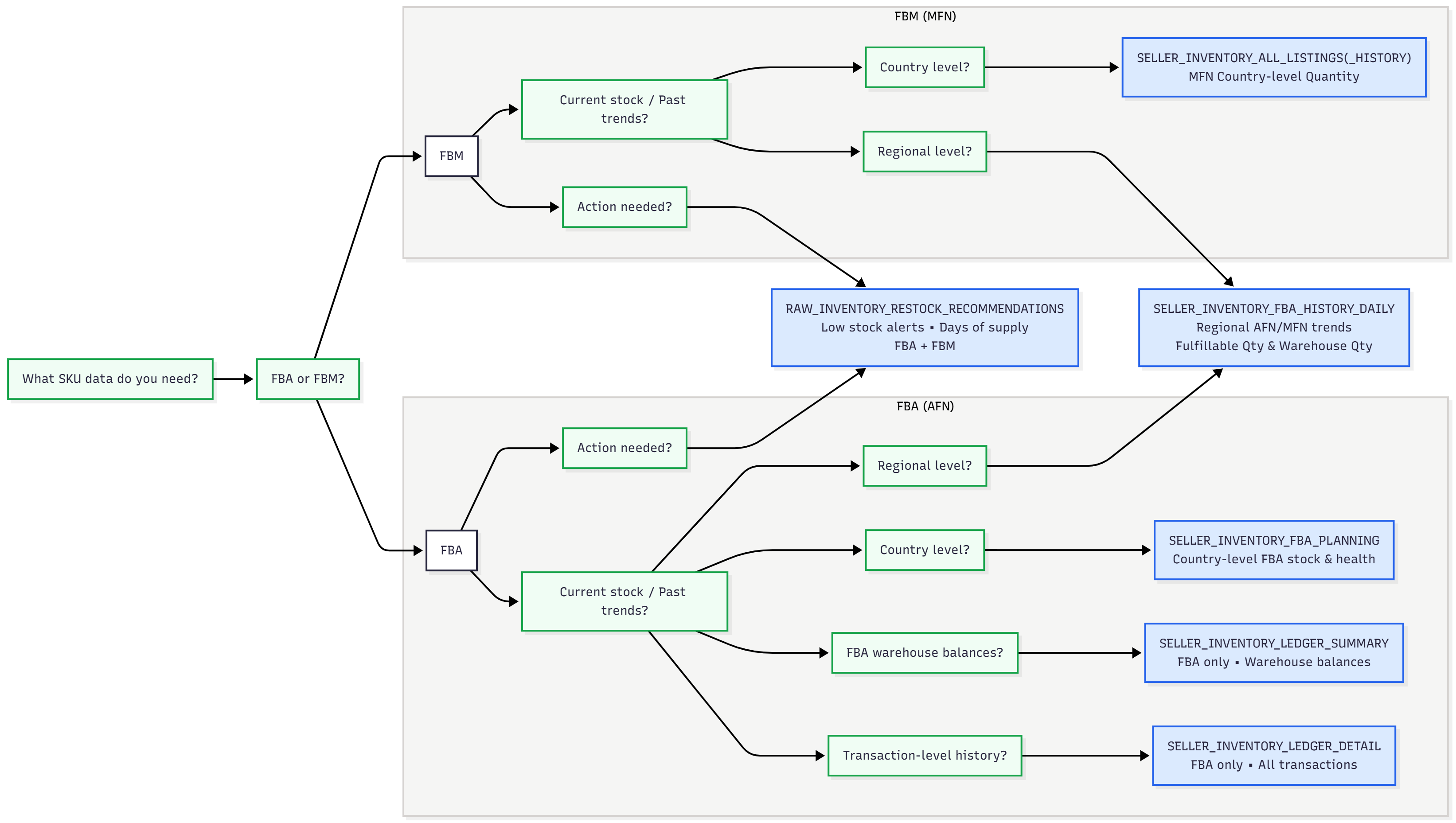
This diagram acts as a decision tree to identify which inventory tables address your specific needs. Start with your question (e.g. "What's my current stock?" or "Why did inventory change?") and follow the branches to locate datasets for real-time snapshots, historical trends, restock alerts, or logistics planning.
Inventory Datasets
All tables live in either the RAW_INVENTORY or SELLING_PARTNER schema (noted per table below).
Start here: covers most questions
| Schema | View | Purpose | Freshness | Coverage |
|---|---|---|---|---|
SELLING_PARTNER | SELLER_INVENTORY_FBA_SUMMARIES | Current FBA stock by status (available, inbound, reserved, researching, unfulfillable) | Daily | All marketplaces enabled on the account |
SELLING_PARTNER | SELLER_INVENTORY_FBA_PLANNING_LATEST | FBA aging, storage costs, sales velocity, pricing and removal recommendations | Daily | All marketplaces except NL, PL, SE, BE and IE; partial for MX |
SELLING_PARTNER | SELLER_INVENTORY_ALL_LISTINGS | FBM price, status, quantity | Daily | All marketplaces |
SELLING_PARTNER | SELLER_INVENTORY | Unified FBA + FBM view: combined stock, price, and condition per ASIN/SKU | Daily | FBA side follows FBA Planning coverage; FBM side all marketplaces |
Summaries or Planning for FBA stock? Use SELLER_INVENTORY_FBA_SUMMARIES to follow your stock. It covers every marketplace on the account, keeps every FBA SKU, reports available the way Seller Central does, and breaks unfulfillable units down by reason (customer, warehouse, distributor or carrier damaged, defective, expired) and reports units Amazon is researching, which Planning doesn't provide. Use SELLER_INVENTORY_FBA_PLANNING_LATEST when you need what Summaries doesn't have: inventory age, storage fees, sales velocity, days of supply and Amazon's recommendations. Total units are very close between the two, but the planning report can count units still in fulfillment center processing as available, and it can leave out SKUs that hold stock, especially outside the US.
SELLER_INVENTORY doesn't add new data. It joins SELLER_INVENTORY_FBA_PLANNING_LATEST and SELLER_INVENTORY_ALL_LISTINGS on ASIN × SKU × Marketplace so you don't have to. Use the individual tables above if you only need one channel or want FBA-specific fields like aging or reserved detail not exposed on the unified view.
History: snapshot tables vs. tables loaded with history
Inventory tables fall into two groups, depending on what Amazon lets us collect. This matters when you need data from before you connected your account.
| Type | Tables | History available |
|---|---|---|
| Snapshot tables | SELLER_INVENTORY_FBA_SUMMARIES (+ _HISTORY), SELLER_INVENTORY_FBA_PLANNING (+ _LATEST), SELLER_INVENTORY_ALL_LISTINGS (+ _HISTORY), RAW_INVENTORY_RESTOCK_RECOMMENDATIONS (+ _HISTORY), SELLER_INVENTORY | From the day you connect your account, moving forward. Amazon only reports the current state, so earlier days can't be loaded |
| Ledger tables | SELLER_INVENTORY_LEDGER_SUMMARY, SELLER_INVENTORY_LEDGER_SUMMARY_BY_FC, SELLER_INVENTORY_LEDGER_DETAIL | Up to 18 months before you connect your account (Amazon's limit), then daily |
Need stock levels from before you connected? Use the ledger tables: ending_warehouse_balance gives your stock per day, by country or fulfillment center. Keep in mind it counts units physically stored in each location, which isn't the same as the marketplace-level available in the snapshot tables.
For specific needs
| Schema | View | Use it for | Why not the default? | Freshness | Coverage |
|---|---|---|---|---|---|
SELLING_PARTNER | SELLER_INVENTORY_FBA_SUMMARIES_HISTORY | Day-by-day trend of FBA stock by status | Summaries only gives the latest snapshot; this is its historized counterpart | Daily | All marketplaces enabled on the account |
SELLING_PARTNER | SELLER_INVENTORY_FBA_PLANNING | Trend of FBA aging, velocity, and recommendations over time | Planning Latest only gives the current snapshot; this is its historized counterpart | Daily | Same as Planning Latest |
SELLING_PARTNER | SELLER_INVENTORY_LEDGER_SUMMARY | Stock balance and net movements by country | Summaries reports what each marketplace can sell, not where units are stored | Daily, 2 to 3 days behind | Country |
SELLING_PARTNER | SELLER_INVENTORY_LEDGER_SUMMARY_BY_FC | Stock balance and net movements by fulfillment center | Same as above, at warehouse level | Daily, 2 to 3 days behind | Fulfillment center |
SELLING_PARTNER | SELLER_INVENTORY_LEDGER_DETAIL | Transaction-level reason for a stock change | Snapshots show current state only; they don't log individual transactions or their causes | Daily | Country + fulfillment center |
RAW_INVENTORY | RAW_INVENTORY_RESTOCK_RECOMMENDATIONS | Amazon's dedicated stock alert + reorder qty/date | Real overlap with Planning, not a clean split (see note below) | Daily (with a gap, since Amazon takes time to process recommendations) | Country |
RAW_INVENTORY | RAW_INVENTORY_RESTOCK_RECOMMENDATIONS_HISTORY | Trend of the restock alert above | Same purpose as the restock report, just historized | Daily | Same as above |
SELLING_PARTNER | SELLER_INVENTORY_ALL_LISTINGS_HISTORY | Trend of FBM price/status/quantity | Listings only gives the latest snapshot; this is its historized counterpart | Daily | All marketplaces |
Restock signals overlap. SELLER_INVENTORY_FBA_PLANNING carries a parallel signal via recommended_action = 'GoToRestock' with recommended_ship_in_quantity / recommended_ship_in_date. It's not a clean split from RAW_INVENTORY_RESTOCK_RECOMMENDATIONS, so check both if you're building alerts.
Don't sum FBA stock across marketplaces. With Pan-European FBA, the European Fulfillment Network or Remote Fulfillment, Amazon shows the same units in every marketplace that can sell them. For stock by physical location, use the ledger summary tables.
Legacy or internal: avoid querying directly
| Schema | View | Why it exists | Why not just use it? |
|---|---|---|---|
RAW_INVENTORY | RAW_INVENTORY_FBA (deprecated) | Raw feed behind older dashboards | Region-level only. Superseded by SELLER_INVENTORY_FBA_SUMMARIES for stock and SELLER_INVENTORY_FBA_PLANNING for aging and recommendations. Its afn_reserved_quantity also leaves out units in transfer between fulfillment centers |
RAW_INVENTORY | RAW_INVENTORY_FBA_HISTORY (deprecated) | Historized version of the report above | Same limitation as RAW_INVENTORY_FBA |
SELLING_PARTNER | SELLER_INVENTORY_FBA_HISTORY_DAILY | Region-level daily trend | Region-level, while Summaries and Planning are marketplace level |
RAW_INVENTORY | RAW_INVENTORY_LEDGER_DETAIL, RAW_INVENTORY_LEDGER_SUMMARY (legacy) | Older fulfillment-center-level ledgers | Replaced by the SELLING_PARTNER ledger tables. Use those instead |
How Tables Connect
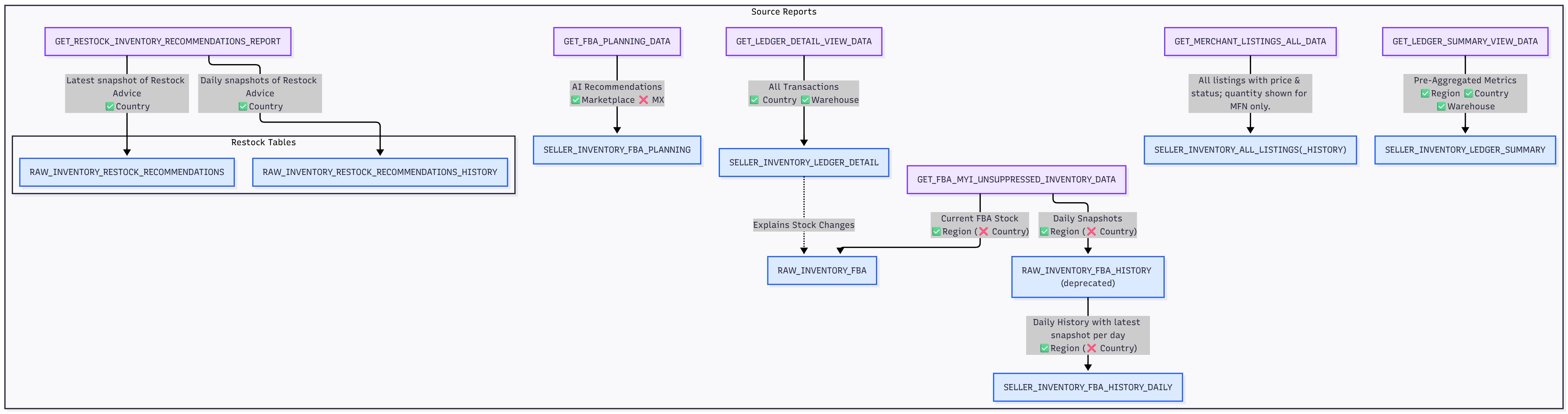
The diagram below traces how raw Amazon reports feed into the transformed views available in your database.
| Amazon source | Tables in your database |
|---|---|
FBA Inventory API (getInventorySummaries) | SELLER_INVENTORY_FBA_SUMMARIES, SELLER_INVENTORY_FBA_SUMMARIES_HISTORY |
FBA Manage Inventory Health report (GET_FBA_INVENTORY_PLANNING_DATA) | SELLER_INVENTORY_FBA_PLANNING, SELLER_INVENTORY_FBA_PLANNING_LATEST, FBA side of SELLER_INVENTORY |
All Listings report (GET_MERCHANT_LISTINGS_ALL_DATA) | SELLER_INVENTORY_ALL_LISTINGS, SELLER_INVENTORY_ALL_LISTINGS_HISTORY, FBM side of SELLER_INVENTORY |
Inventory Ledger summary report (GET_LEDGER_SUMMARY_VIEW_DATA), by country | SELLER_INVENTORY_LEDGER_SUMMARY |
Inventory Ledger summary report (GET_LEDGER_SUMMARY_VIEW_DATA), by fulfillment center | SELLER_INVENTORY_LEDGER_SUMMARY_BY_FC |
Inventory Ledger detail report (GET_LEDGER_DETAIL_VIEW_DATA) | SELLER_INVENTORY_LEDGER_DETAIL |
Manage FBA Inventory report (GET_FBA_MYI_UNSUPPRESSED_INVENTORY_DATA) | RAW_INVENTORY_FBA, RAW_INVENTORY_FBA_HISTORY, SELLER_INVENTORY_FBA_HISTORY_DAILY |
Practical Scenarios & Example Queries
Everyday FBA stock questions
"What's my current FBA stock?"
Use SELLER_INVENTORY_FBA_SUMMARIES, your default for FBA stock.
SELECT MARKETPLACE_KEY, SKU, ASIN, AVAILABLE, RESERVED_QUANTITY, INBOUND_QUANTITY, UNFULFILLABLE_QUANTITY, TOTAL_QUANTITY
FROM SELLER_INVENTORY_FBA_SUMMARIES
WHERE TOTAL_QUANTITY > 0
ORDER BY AVAILABLE DESC;
"How has my stock changed day by day?"
SELECT SNAPSHOT_DATE, MARKETPLACE_KEY, AVAILABLE, RESERVED_QUANTITY, INBOUND_QUANTITY
FROM SELLER_INVENTORY_FBA_SUMMARIES_HISTORY
WHERE SKU = 'X'
ORDER BY SNAPSHOT_DATE DESC;
"Does Amazon recommend any action on my stock?"
Use SELLER_INVENTORY_FBA_PLANNING_LATEST for aging and recommendations.
Key columns:
recommended_action: Amazon's pricing/removal adviceinv_age_365_plus_days: units aged over 1 yearestimated_storage_cost_next_month: projected fee exposure
SELECT SNAPSHOT_DATE, ASIN, SKU, RECOMMENDED_ACTION, INV_AGE_365_PLUS_DAYS, ESTIMATED_STORAGE_COST_NEXT_MONTH
FROM SELLER_INVENTORY_FBA_PLANNING
WHERE SKU = 'X'
ORDER BY SNAPSHOT_DATE DESC;
"Which aged SKUs should I remove to avoid storage fees?"
SELECT SKU, INV_AGE_365_PLUS_DAYS, RECOMMENDED_ACTION, ESTIMATED_STORAGE_COST_NEXT_MONTH
FROM SELLER_INVENTORY_FBA_PLANNING_LATEST
WHERE INV_AGE_365_PLUS_DAYS > 0;inv_age_365_plus_days is not populated for US, DE, UK, FR, IT, or ES. For those marketplaces, use inv_age_366_to_455_days and inv_age_456_plus_days instead to capture the same "aged over a year" population.
"Amazon says restock, but I have inventory. What's going on?"
The likely explanation: what you're counting as "my inventory" is total units, but Amazon's restock alert is based on available, which is sellable stock only. A SKU can have plenty of total inventory while very little of it is actually sellable, if a large share is inbound, reserved, being researched, or unfulfillable.
First, check the breakdown in SELLER_INVENTORY_FBA_SUMMARIES:
SELECT AVAILABLE, RESERVED_CUSTOMER_ORDER, RESERVED_FC_TRANSFER, RESERVED_FC_PROCESSING,
       RESEARCHING_QUANTITY, UNFULFILLABLE_QUANTITY,
       INBOUND_WORKING, INBOUND_SHIPPED, INBOUND_RECEIVING
FROM SELLER_INVENTORY_FBA_SUMMARIES
WHERE SKU = 'YOUR_SKU';
If reserved, researching, or unfulfillable units account for a large chunk of the total, that's inventory that exists but isn't currently sellable, which explains the alert despite what looks like enough stock.
If available genuinely looks sufficient, check weeks_of_cover_t30 in Planning: a low value means Amazon's recommendation is forward-looking. It's forecasting that your current stock won't cover projected demand, not claiming you're already out.
SELECT WEEKS_OF_COVER_T30, DAYS_OF_SUPPLY
FROM SELLER_INVENTORY_FBA_PLANNING_LATEST
WHERE SKU = 'YOUR_SKU';
Cross-check the actual alert in RAW_INVENTORY_RESTOCK_RECOMMENDATIONS.
Everyday FBM questions
"What products are active/inactive, and what's my current price per SKU?"
Use SELLER_INVENTORY_ALL_LISTINGS, your default for FBM/MFN questions.
SELECT SKU, PRICE, STATUS, QUANTITY
FROM SELLER_INVENTORY_ALL_LISTINGS
WHERE SKU = 'X';
Cross-channel questions
"What's my combined FBA + FBM available and total stock for this SKU?"
Use SELLER_INVENTORY. It blends both channels so you don't need to join manually.
SELECT ASIN, SKU, TOTAL_AVAILABLE_QUANTITY, TOTAL_QUANTITY, FBA_LISTING_EXISTS, FBM_LISTING_EXISTS
FROM SELLER_INVENTORY
WHERE SKU = 'X';
"Is this listing only on one channel?"
SELECT ASIN, SKU, FBA_LISTING_EXISTS, FBM_LISTING_EXISTS
FROM SELLER_INVENTORY
WHERE FBA_LISTING_EXISTS = 'No' OR FBM_LISTING_EXISTS = 'No';
When you need more than a stock snapshot
"Which SKUs need urgent restocking?"
Use RAW_INVENTORY_RESTOCK_RECOMMENDATIONS, the report Amazon uses specifically for stock alerts.
SELECT SKU, ALERT, RECOMMENDED_REPLENISHMENT_QTY, RECOMMENDED_SHIP_DATE
FROM RAW_INVENTORY_RESTOCK_RECOMMENDATIONS
WHERE ALERT IN ('low stock', 'no stock');
Two things worth knowing:
- Planning has a parallel signal.
recommended_action = 'GoToRestock'withrecommended_ship_in_quantity/recommended_ship_in_datecan carry similar guidance. - SKU missing from this report? It likely means Amazon doesn't currently flag it as at-risk. No recent sales, healthy days-of-supply, or no projected demand are the usual reasons.
"Which FNSKU is linked to each ASIN/SKU?"
FNSKU isn't exposed on SELLER_INVENTORY_ALL_LISTINGS or on the unified SELLER_INVENTORY view (see the known gap note on the unified view's page). It is available on SELLER_INVENTORY_FBA_SUMMARIES, which lists every FBA SKU on the account, including SKUs with no stock.
SELECT DISTINCT MARKETPLACE_KEY, ASIN, SKU, FNSKU
FROM SELLER_INVENTORY_FBA_SUMMARIES;
Join on ASIN and SKU (and MARKETPLACE_KEY) to bring FNSKU onto your SELLER_INVENTORY rows.
"Where is my stock physically stored?"
Snapshots report what each marketplace can sell. For stock by location, use the ledger summary, by country or by fulfillment center.
SELECT COUNTRY, SUM(ENDING_WAREHOUSE_BALANCE) AS SELLABLE_UNITS
FROM SELLER_INVENTORY_LEDGER_SUMMARY
WHERE DISPOSITION = 'SELLABLE'
  AND DATE = (SELECT MAX(DATE) FROM SELLER_INVENTORY_LEDGER_SUMMARY)
GROUP BY COUNTRY;
"Why did my inventory drop by 200 units in a specific country/warehouse last week?"
Snapshots give you the current state, not the transaction-level reason for a change. For that, use the ledger detail.
SELECT EVENT_TYPE, QUANTITY, FULFILLMENT_CENTER, DATE
FROM SELLER_INVENTORY_LEDGER_DETAIL
WHERE MSKU = 'X'
  AND COUNTRY = 'US'
  AND DATE BETWEEN '2026-10-01' AND '2026-10-07';
"What's my net inventory change in each warehouse this week?"
Same idea, but you just want the aggregated net change, not every individual transaction.
SELECT FULFILLMENT_CENTER, DATE, STARTING_WAREHOUSE_BALANCE, ENDING_WAREHOUSE_BALANCE
FROM SELLER_INVENTORY_LEDGER_SUMMARY_BY_FC
WHERE DATE BETWEEN '2026-10-01' AND '2026-10-07';
For the same question at country level, query SELLER_INVENTORY_LEDGER_SUMMARY and use COUNTRY instead of FULFILLMENT_CENTER.
Amazon DataHawk Reports
DataHawk Reports provide curated, business-ready datasets designed for reporting, analytics, and executive decision-making.
FBA Inventory Summaries Data
Daily FBA stock snapshot per SKU and marketplace, with available, inbound, reserved, researching and unfulfillable units broken down by status.