
Introduction
Connect any AI assistant, Claude, ChatGPT, Cursor, n8n, Make, directly to your Amazon data using the Model Context Protocol.
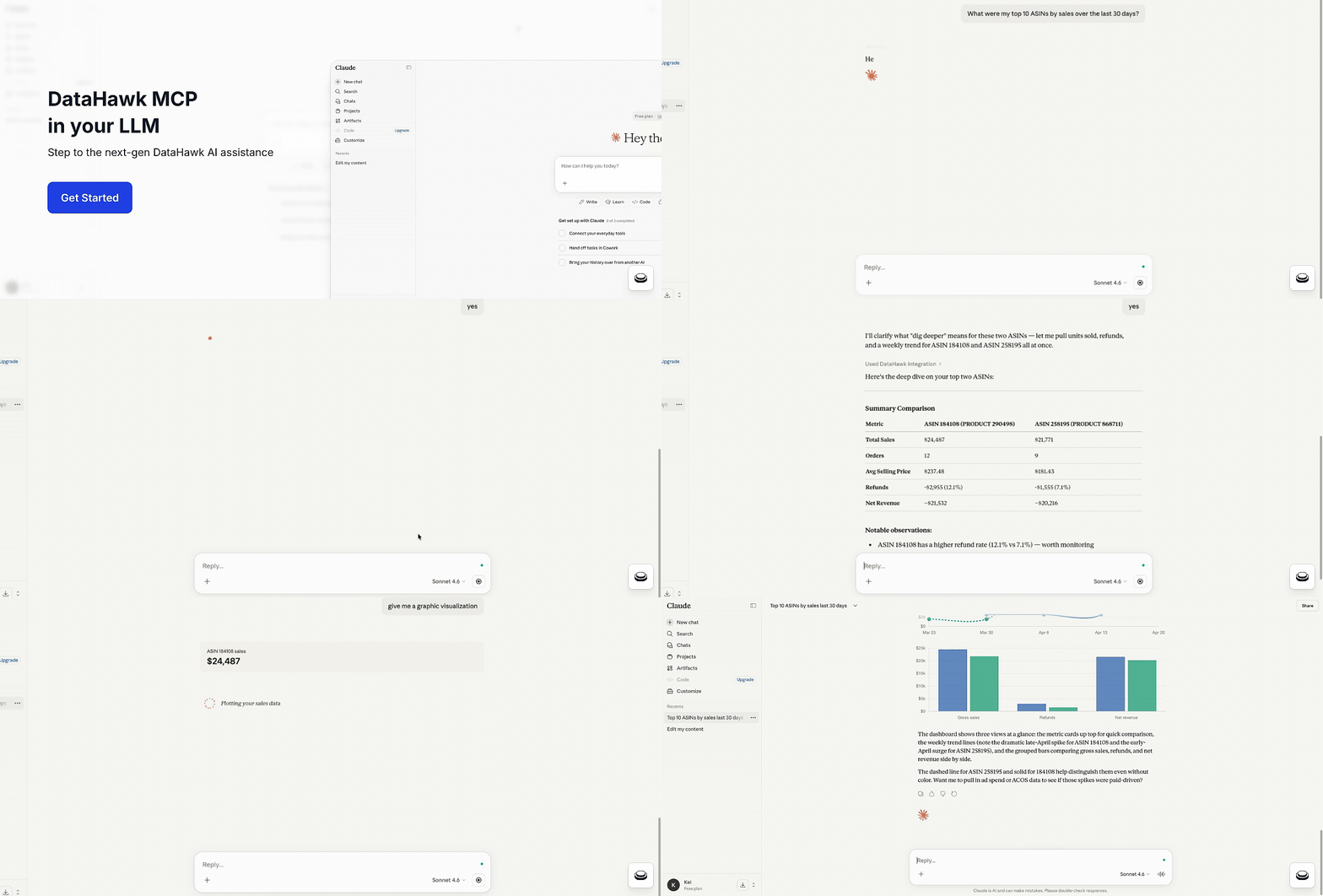
DataHawk MCP (Model Context Protocol) lets any AI assistant, Claude, ChatGPT, Cursor, n8n, Make, Lovable, Replit, or your own agent, talk directly to your Amazon data. Ask a question in plain English, get a grounded answer from your actual DataHawk workspace. No SQL, no waiting.
What is an MCP?
MCP stands for Model Context Protocol: An open standard for connecting AI assistants to external data sources and tools. Think of it as USB-C for AI: One server, every AI client.
For a deeper primer, see Anthropic's MCP introduction.
DataHawk runs an MCP server that exposes your Amazon data to any MCP-compatible AI. The AI discovers what's available automatically, picks the right tool for the question, and returns a real answer grounded in your workspace.
Why it matters for Amazon sellers and agencies
Amazon data lives across SP-API, the Ads API, vendor reports, brand analytics, DSP exports, and a dozen other surfaces. Getting a clean answer to a simple question, which products drove growth last month?, normally means stitching reports together, reconciling currencies, and chasing marketplace-specific quirks.
DataHawk already does that stitching. MCP lets you talk to the result in natural language, from whatever AI tool you already use.
Instead of spending weeks building SP-API and Ads API integrations yourself, you plug into DataHawk and get everything, sales, ads, inventory, catalog, SEO, traffic, DSP, finance, vendor, ready to query.
Before you start
You'll need two things:
- A DataHawk workspace with at least one source connected: Amazon (Seller, Vendor, Advertising, or public data) or Walmart (Marketplace, Connect).
- An AI client that supports MCP: Claude, ChatGPT, Cursor, Replit, Lovable, n8n, Make, or your own agent.
Free Claude and ChatGPT tiers work fine. You may hit message limits faster on free plans; paid tiers (Claude Pro, ChatGPT Plus, etc.) give you more capacity for back-and-forth conversations.
DataHawk MCP is currently in beta and free for all DataHawk customers while we polish it ahead of general availability.
What you can do with DataHawk MCP
Ask questions in plain English
No more writing queries or navigating dashboards. Here's a sample of what your AI can handle:
- Simple lookups: "What was my total revenue yesterday in the US marketplace?"
- Rankings: "Top 10 ASINs by revenue last 30 days, US marketplace."
- Comparisons, "Compare my US and UK marketplaces for Q1 2026, revenue, units, ACOS, conversion."
- Trends: "Weekly revenue for the last 12 weeks in the US, as a trend."
- Flags and alerts: "Any ASIN currently out of stock that did > $10,000 revenue last 30 days?"
- Diagnostic: "Why did my revenue drop last week?"
- Multi-step analysis: "Find my worst-performing campaigns last 30 days, then show me which specific keywords inside them are pulling ACOS up."
- Catalog and competitive: "Which of my ASINs have the buy box enabled but I'm not winning it?"
- Vendor-specific: "Show me aged 90+ days sellable inventory by brand."
- Finance: "Top 10 fee categories by amount in USD last quarter."
These are examples, not finished prompts. They show what kinds of questions DataHawk MCP can handle. For polished templates, see Ready-to-use prompts. To learn how to write your own effective prompts, see the Prompting guide.
Investigate anomalies, not just pull metrics
DataHawk MCP includes a dedicated investigation flow for diagnostic questions like why did revenue drop last week? or what's driving the ACOS spike on Brand X?
The server characterizes the anomaly, ranks hypotheses, and walks your AI through evidence-gathering across sales, ads, traffic, catalog, and inventory; escalating from summary signals to drill-downs to forensic detail.
Automate the boring stuff
MCP isn't just for chat. You can connect it to automation tools like n8n, Make, Replit, or Lovable and set up things like:
- A daily Slack message with yesterday's revenue and top movers
- An email alert when any ASIN runs low on inventory
- A weekly report auto-delivered to your team every Monday morning
- A custom internal dashboard your team can check anytime
Building something heavier? For large-scale work, pulling years of data, joining DataHawk with your own systems, building custom analytics pipelines, your Snowflake or BigQuery data warehouse export is a better fit than MCP (DataHawk's API configures the workspace and isn't a data-retrieval channel). Email [email protected] and we'll point you in the right direction.
Cover every Amazon marketplace and business model
- Sellers and vendors: Dedicated data surfaces for each business model
- All Amazon marketplaces: US, CA, MX, UK, DE, FR, ES, IT, NL, SE, PL, JP, AU and beyond
- Every major data domain: Sales, advertising (SP/SB/SD + DSP), catalog, inventory, SEO/keyword rankings, traffic, finance, and returns
- Currently with 180 days of history
Keep your data safe
Your data lives in your DataHawk workspace and stays there. When you connect an AI client through MCP, only the answers to your questions flow back to that AI, and only when you ask.
- You decide which AI sees your data. MCP only talks to the AI client you've explicitly connected. You can disconnect any time.
- Everything's encrypted in transit.
- GDPR-aligned. DataHawk is operated by Worldeye Technologies Europe and complies with GDPR. Email [email protected] to exercise data rights.
Behind the scenes — what your AI does with your prompt
When you send a prompt, your AI runs a four-step flow against DataHawk:
- Plan: Your question gets routed to the right data view (sales, ads, inventory, etc.) along with required filters.
- Discover: If the view doesn't already have what's needed, the AI inspects the full catalog of metrics and dimensions.
- Validate: Field names, filters, and date ranges get checked server-side before anything runs.
- Load: The query executes against your workspace and returns real numbers.
For diagnostic questions ("why did X happen?"), the AI runs a parallel investigate flow that ranks hypotheses and gathers evidence across domains.
What MCP doesn't do (yet)
- Walmart data: Not yet. MCP currently covers Amazon only.
- Read-only. MCP can answer questions about your data, but it can't update listings, change ad budgets, or take any action on your Amazon accounts.
- Not a dashboard replacement. For scheduled reports and visual deep-dives, the DataHawk app and Power BI / Looker dashboards remain the right home.
- Bounded history. 13 complete months of history are available today.
Data coverage at a glance
| Domain | What's in it |
|---|---|
| Sales | Ordered product sales, units, average selling price, order-line detail, B2B breakouts |
| Advertising | Sponsored Products / Brands / Display at campaign, product, and keyword grain. ACOS, ROAS, spend, clicks, impressions, attributed sales |
| DSP | Total cost, attributed sales, new-to-brand metrics, detail-page views, eCPM, creative-level detail |
| Catalog | Price, rating, review count, buy box state, A+ content flags, variation data, browse classification |
| Traffic | Sessions, page views, buy box share, browser vs. mobile-app split |
| SEO | Keyword rankings, organic vs. sponsored visibility, product-keyword coverage |
| Inventory | FBA on-hand, reserved, inbound (shipped/receiving/working), unsellable, MFN fulfillable |
| Finance | Profit ledger line-level detail in marketplace currency and USD |
| Brand store | Store visits, page views, attributed sales and orders |
| Vendor | Manufacturing and sourcing views; sales, traffic, sell-through, fill rate, lead time, aged inventory |
How fresh is the data? DataHawk refreshes once a day, at 9 AM PST. See How DataHawk Sources Your Data for the full source-by-source freshness table.
What's shipping next
- Walmart data: Adding Walmart Marketplace and Walmart Connect surfaces
- Deeper Amazon data coverage: Expanding vendor, brand analytics, and market intelligence
- Native ChatGPT and Claude apps: Tighter integration with the major AI clients
Have a feature request? Email [email protected].
Start here
Set up DataHawk MCP
Connect Claude, ChatGPT, or any MCP-compatible client in under 2 minutes.
Ready-to-use prompts
Full templates for weekly reports, deep-dives, and trackers.
How to write effective prompts
Get the right answer on the first try.
Going further with the MCP
Performance, verification, and advanced patterns.
FAQ
Troubleshooting and common questions.