
Snowflake
Connect DataHawk to Snowflake; a cloud-native data warehouse for use with Power BI, Excel, Tableau, and any SQL-compatible tool.
Snowflake is a cloud-native data warehouse built for performance and scale. DataHawk uses Snowflake as the hosted database for users who work with Power BI, Excel, Tableau, or any SQL-compatible tool outside of Google's ecosystem.
Your DataHawk Snowflake database
When you set up a Snowflake destination, DataHawk creates and manages a dedicated database containing all your collected data. You don't need to configure or maintain anything. We handle setup, scaling, and maintenance.
What's included:
- Daily updated tables, fresh and analysis-ready
- Optimized views, cleaned and enriched by DataHawk
- No infrastructure management on your side
DataHawk refreshes your Snowflake database every day. Not all data arrives at the same time. Some datasets are populated later in the day depending on when Amazon's API makes them available. See the individual dataset pages in the Knowledge Hub for dataset-specific freshness details.
Option 1 — DataHawk-hosted Snowflake (recommended for most users)
This is the default setup. DataHawk creates and hosts the Snowflake database for you.
How to find your credentials
In your DataHawk workspace, navigate to Setup > Destinations > Snowflake > See Credentials.
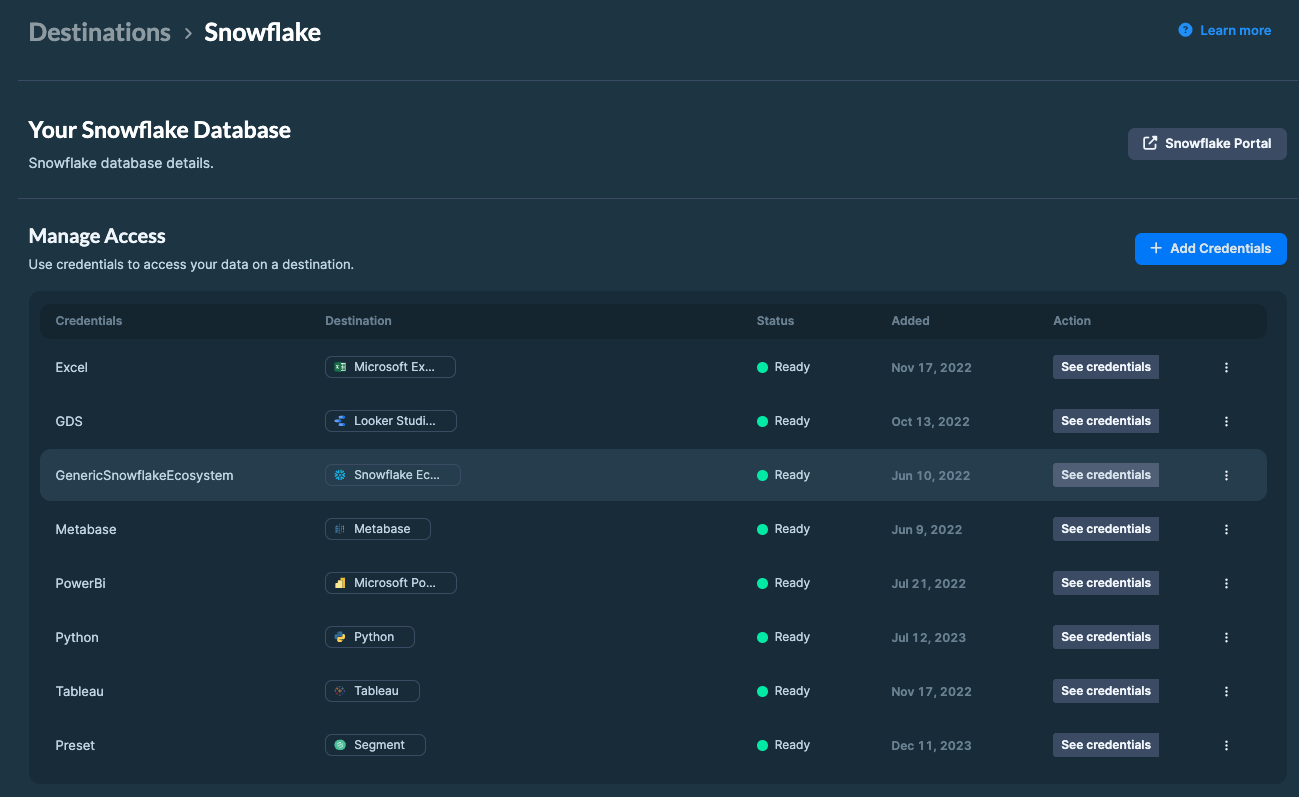
Your credentials page will contain the following:
| Field | Description |
|---|---|
| User | Your Snowflake username |
| Password | Your Snowflake password |
| Server | The Snowflake account URL (e.g. xyz123.eu-west-1.snowflakecomputing.com) |
| Database | The name of your DataHawk database |
| Warehouse | The compute warehouse to use for queries |
Keep these credentials safe. You'll use them to connect your database to your BI tool or SQL editor.
Option 2 — Self-hosted Snowflake (advanced)
If you already use Snowflake and prefer to have DataHawk write data into your own Snowflake account, this is possible.
To get started, contact your Account Manager and share your:
- Snowflake account identifier
- Cloud hosting provider (AWS, Azure, GCP) and region
Snowflake Credits
DataHawk-hosted Snowflake databases consume Snowflake credits. Credits are used when your warehouse is active (running queries).
See Snowflake credit usage and consumption monitoring to understand how credits are consumed, what happens if you exceed your quota, and how to track your own usage with self-serve SQL queries.
Query timeout (30 minutes)
Since November 2025, all Snowflake Data Sharing queries are subject to a default 30-minute timeout. Queries that exceed 30 minutes are cancelled by the warehouse. This guardrail prevents runaway queries from consuming credits and is applied at the warehouse level for every customer.
How to verify the limit: In your SQL client, run SHOW PARAMETERS LIKE 'STATEMENT_TIMEOUT_IN_SECONDS' IN WAREHOUSE <your_warehouse>;: The value should be 1800 (seconds).
Write queries that finish in under 30 minutes:
- Filter early: Restrict by
marketplace_key,date, brand, or ASIN before joining wide tables. - Limit date ranges in exploratory queries (e.g.
WHERE date >= DATEADD(month, -3, CURRENT_DATE)). - Use the curated
REPORTS.*views when possible. They are pre-aggregated and substantially faster than building from raw layers. - Avoid
SELECT *on the largest raw tables (advertising, profit ledger, search). Project only the columns you need. - Break very large extracts into multiple smaller queries (e.g. month-by-month) rather than a single multi-year scan.
If a query is cancelled by the timeout:
- Check the Snowflake query history (
QUERY_HISTORY) to confirm the cancellation reason. - See Accessing our Snowflake database from behind a firewall for network-side issues that can also cause long-running or stalled queries.
Compatible tools
Snowflake connects natively to most modern data tools. Common examples:
| Category | Tools |
|---|---|
| Business Intelligence | Power BI, Tableau, Metabase, Sigma Computing |
| SQL & Analytics | Hex, Deepnote, Streamlit |
| Data Science & ML | dbt, Python / R notebooks |
Where to go next
Power BI is the recommended tool for DataHawk users on Snowflake. DataHawk provides pre-built Power BI templates covering sales, advertising, keywords, profitability, and more.
Connect to Power BI
Full setup guide for both the DataHawk template route and the manual Snowflake connector.
Connect to Excel
Pull Snowflake data into Excel via ODBC for auto-refreshed workbooks.
Power BI Dashboards
Browse the dashboard catalog; seller, advertising, vendor, market intelligence, and more.
Snowflake credit monitoring
Track your credit consumption, understand quota limits, and find your heaviest queries.
BigQuery
Connect DataHawk to BigQuery, Google's cloud data warehouse, for use with Looker Studio, Google Sheets, Python, and other tools.
Writable Database Service
Add write access to a separate database alongside your DataHawk read-only database to bring in your own data, build custom pipelines, and create combined views.